
Your first scan (API)
Call the Bodygram Platform REST API directly with your org ID and API key to get body measurements and a 3D avatar from user stats.
The Bodygram Platform exposes a single REST endpoint for creating scans. If you have an Organization ID and an API key, you can call it directly — no SDK required. This page walks through the two input modes, starting with stats-only.
Don't have an account yet? Sign up free at platform.bodygram.com — you get 5 free scans to explore the API.
Two input modes
The POST /api/orgs/{ORG_ID}/scans endpoint accepts two different payload shapes depending on what data you have:
| Mode | Key in request body | What you get back |
|---|---|---|
| Stats only | statsEstimations | Body measurements, 3D avatar |
| Stats + photos | photoScan | Body measurements, 3D avatar, body composition, posture |
This guide covers stats-only first. Photo scanning is covered in the next section.
Stats-only scan
Send the user's age, gender, height (in mm), and weight (in g) under the statsEstimations key:
curl -X POST "https://platform.bodygram.com/api/orgs/${ORG_ID}/scans" \
  --header "Content-Type: application/json" \
  --header "Authorization: ${API_KEY}" \
  --data '{
    "statsEstimations": {
      "age": 29,
      "gender": "female",
      "height": 1640,
      "weight": 54000
    }
  }'
const response = await fetch(
`https://platform.bodygram.com/api/orgs/${ORG_ID}/scans`,
{
method: 'POST',
headers: {
'Authorization': API_KEY,
'Content-Type': 'application/json',
},
body: JSON.stringify({
statsEstimations: {
age: 29,
gender: 'female',
height: 1640, // mm — 164 cm × 10
weight: 54000, // g — 54 kg × 1000
},
}),
}
);
const { entry } = await response.json();
console.log(entry.status); // 'success' | 'failure'
console.log(entry.measurements); // [{ name, unit, value }, ...]
console.log(entry.avatar); // { data (base64 .obj), format, type }import requests
url = f"https://platform.bodygram.com/api/orgs/{ORG_ID}/scans"
response = requests.post(
url,
headers={"Authorization": API_KEY},
json={
"statsEstimations": {
"age": 29,
"gender": "female",
"height": 1640, # mm — 164 cm × 10
"weight": 54000, # g — 54 kg × 1000
}
},
)
entry = response.json()["entry"]
print(entry["status"]) # 'success' | 'failure'
print(entry["measurements"]) # [{ name, unit, value }, ...]
print(entry["avatar"]) # { data (base64 .obj), format, type }Units
height is in millimeters — 164 cm → 1640. weight is in grams — 54 kg → 54000.
Response
A successful response has entry.status: "success" and includes:
entry.measurements— array of{ name, unit, value }body dimensions (full list)entry.avatar— base64-encoded Wavefront.obj3D model (how to render it)
{
  "entry": {
    "id": "scan_testIDFHsFggF",
    "status": "success",
    "measurements": [
      { "name": "bustGirth",  "unit": "mm", "value": 895 },
      { "name": "waistGirth", "unit": "mm", "value": 762 },
      { "name": "hipGirth",   "unit": "mm", "value": 905 }
    ],
    "avatar": {
      "data": "<BASE64_ENCODED_OBJ>",
      "format": "obj",
      "type": "highResolution"
    },
    "bodyComposition": null,
    "posture": null
  }
}
Always check entry.status before reading other fields — on "failure" all data fields are null.
All completed scans are saved to your account — view and manage them from your Bodygram dashboard.
Stats + photos scan
Adding two photos unlocks additional outputs that stats alone cannot provide:
| Extra field | What it contains |
|---|---|
entry.bodyComposition | Estimated body fat %, lean mass, and more |
entry.posture | Posture angles and alignment data |
Photos
You need two JPEG photos of the person being scanned — one front-facing and one right-side-facing — taken in good lighting with the subject standing upright. You can use these sample images to try the endpoint:
| Front | Right |
|---|---|
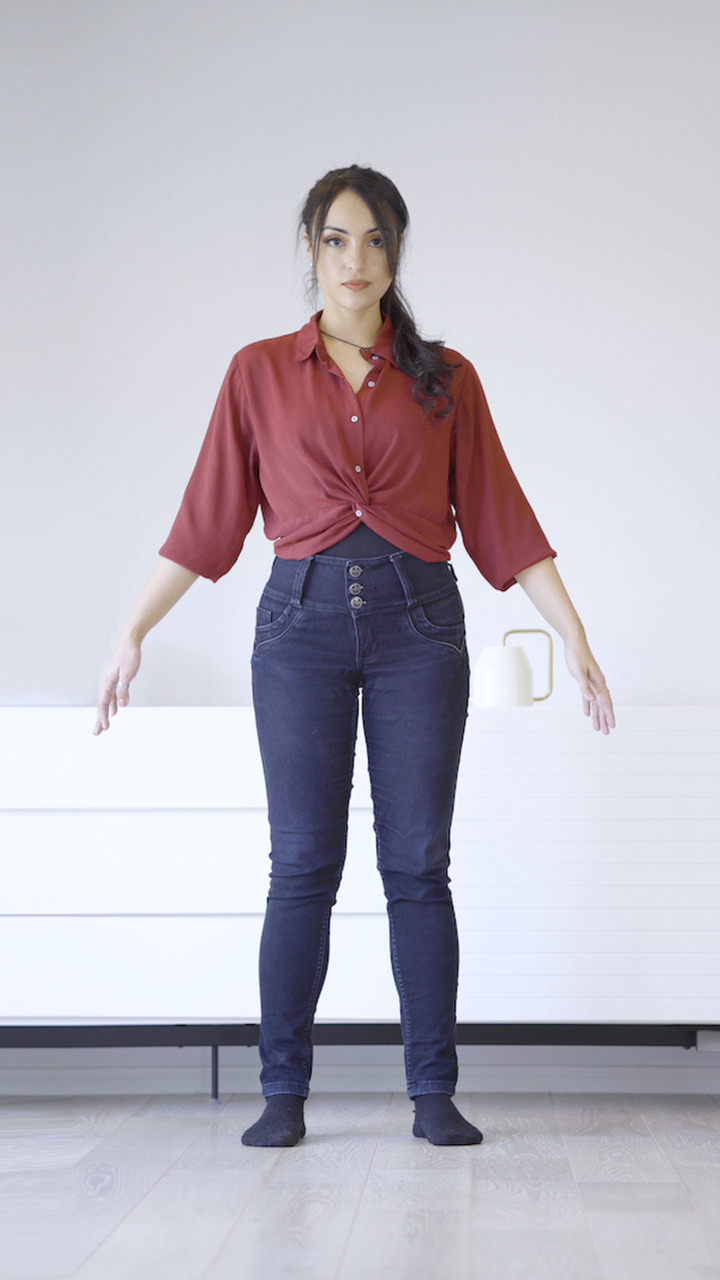 | 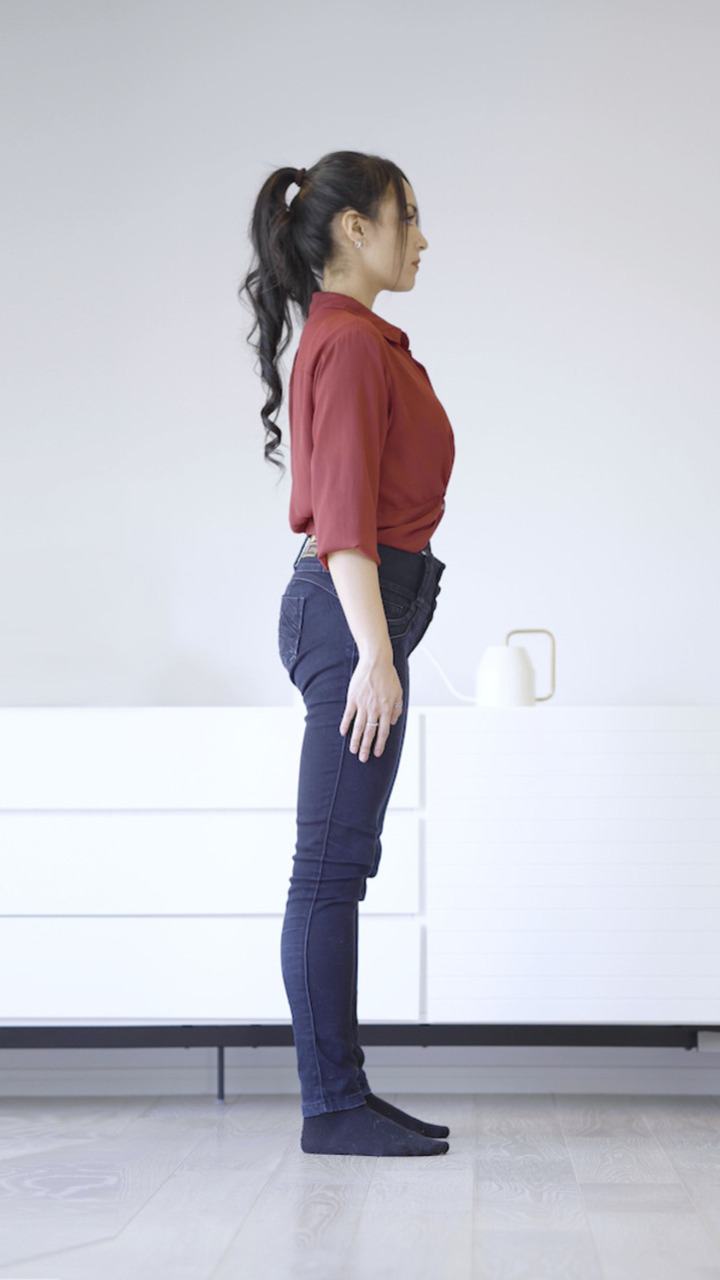 |
Capturing photos in your own UI? See Pose guidelines for the framing, A-pose angle, and resolution rules your input photos need to follow for accurate results.
Encode to base64
The API expects both photos as base64 strings (RFC 4648) in the request body:
export FRONT_PHOTO_BASE64=$(base64 -i front.jpg)
export RIGHT_PHOTO_BASE64=$(base64 -i right.jpg)
import { readFileSync } from 'fs';
const frontPhotoBase64 = readFileSync('front.jpg').toString('base64');
const rightPhotoBase64 = readFileSync('right.jpg').toString('base64');import base64
with open('front.jpg', 'rb') as f:
front_photo_base64 = base64.b64encode(f.read()).decode()
with open('right.jpg', 'rb') as f:
right_photo_base64 = base64.b64encode(f.read()).decode()Send the request
Use the photoScan key instead of statsEstimations, and include frontPhoto and rightPhoto:
curl -X POST "https://platform.bodygram.com/api/orgs/${ORG_ID}/scans" \
  --header "Content-Type: application/json" \
  --header "Authorization: ${API_KEY}" \
  --data "{
    \"photoScan\": {
      \"age\": 29,
      \"gender\": \"female\",
      \"height\": 1640,
      \"weight\": 54000,
      \"frontPhoto\": \"${FRONT_PHOTO_BASE64}\",
      \"rightPhoto\": \"${RIGHT_PHOTO_BASE64}\"
    }
  }"
const response = await fetch(
`https://platform.bodygram.com/api/orgs/${ORG_ID}/scans`,
{
method: 'POST',
headers: {
'Authorization': API_KEY,
'Content-Type': 'application/json',
},
body: JSON.stringify({
photoScan: {
age: 29,
gender: 'female',
height: 1640, // mm — 164 cm × 10
weight: 54000, // g — 54 kg × 1000
frontPhoto: frontPhotoBase64,
rightPhoto: rightPhotoBase64,
},
}),
}
);
const { entry } = await response.json();
console.log(entry.status); // 'success' | 'failure'
console.log(entry.measurements); // [{ name, unit, value }, ...]
console.log(entry.bodyComposition); // body fat %, lean mass, ...
console.log(entry.posture); // posture angles and alignmentimport requests
response = requests.post(
f"https://platform.bodygram.com/api/orgs/{ORG_ID}/scans",
headers={"Authorization": API_KEY},
json={
"photoScan": {
"age": 29,
"gender": "female",
"height": 1640, # mm — 164 cm × 10
"weight": 54000, # g — 54 kg × 1000
"frontPhoto": front_photo_base64,
"rightPhoto": right_photo_base64,
}
},
)
entry = response.json()["entry"]
print(entry["status"]) # 'success' | 'failure'
print(entry["measurements"]) # [{ name, unit, value }, ...]
print(entry["bodyComposition"]) # body fat %, lean mass, ...
print(entry["posture"]) # posture angles and alignmentUnits
Same as stats-only: height in millimeters, weight in grams.
Response
A successful response has entry.status: "success" and includes:
entry.measurements— array of{ name, unit, value }body dimensions (full list)entry.avatar— base64-encoded Wavefront.obj3D model (how to render it)entry.bodyComposition— body composition estimates (fat mass, lean mass, body fat %)entry.posture— posture angle measurements derived from the photos
{
  "entry": {
    "id": "scan_testIDFHsFggF",
    "status": "success",
    "measurements": [
      { "name": "bustGirth",  "unit": "mm", "value": 895 },
      { "name": "waistGirth", "unit": "mm", "value": 762 },
      { "name": "hipGirth",   "unit": "mm", "value": 905 }
    ],
    "avatar": {
      "data": "<BASE64_ENCODED_OBJ>",
      "format": "obj",
      "type": "highResolution"
    },
    "bodyComposition": {
      "bodyFatPercentage": { "unit": "percent", "value": 24.3 },
      "bodyFatMass":       { "unit": "g",       "value": 13122 },
      "leanMass":          { "unit": "g",       "value": 40878 }
    },
    "posture": [
      { "name": "headTilt",        "unit": "degree", "value": 2.1 },
      { "name": "shoulderBalance", "unit": "degree", "value": 1.4 },
      { "name": "hipBalance",      "unit": "degree", "value": 0.8 }
    ]
  }
}
Always check entry.status before reading other fields — on "failure" all data fields are null.
Try it live
Enter your credentials and stats below to run a real stats-only scan against the API.
Interactive Demo
Enter your Bodygram credentials. Find them on your account page. Never call this endpoint directly from the browser in production — your API key must stay server-side.
Your organization ID
Demo only — keep server-side in production
Collect the shopper's stats first. Gender is used both by the estimation call and to pick the correct scanner silhouette in the next step.
Upload a front-facing and right-side photo. The person should be standing upright in good lighting.
Ready to call POST /api/orgs//scans with a photoScan payload.
Related
- API Reference — full endpoint, request schema, and response types
- Visualizing the avatar — decode and render the base64
.objin three.js - Use API + Scanner UI — let Bodygram capture the photos for you