
API Reference
Reference documentation for the Bodygram Platform REST API — scans, scan tokens, avatar, posture, and measurements.
Endpoint-level reference (requests, responses, error codes, rate limits) is still being written. The Avatar, Posture, and Platform measurements sections below are complete.
What you'll find here
Complete reference for the Bodygram Platform REST API:
- Authentication — using your
API keyin theAuthorizationheader POST /api/orgs/{ORG_ID}/scans— create a scan from two photos, returns measurements and avatarPOST /api/orgs/{ORG_ID}/scan-tokens— issue a short-lived scan token for the hosted Bodygram Scanner- Request and response schemas —
photoScan,entry,measurements[],avatar,posture, error codes - Scopes —
api.platform.bodygram.com/scans:create,api.platform.bodygram.com/scans:read - Rate limits and quotas
Avatar
The avatar object is returned in the entry of any successful scan response — both photo scans and stats-only scans. It contains a 3D model of the scanned body as a base64-encoded Wavefront .obj file.
type Avatar = {
  data: string;            // base64-encoded .obj file
  format: 'obj';
  type: 'highResolution';
};| Field | Description |
|---|---|
data | The .obj file, base64-encoded. Decode it to get standard Wavefront OBJ text. |
format | Always "obj". |
type | Always "highResolution". |
On status: "failure" the avatar field is null. See Visualizing the avatar for a complete three.js render example.
Posture
The posture object contains pose analysis data for the front and right views captured during scanning. Each view returns two arrays:
angles— measured angles (in degrees) for named body landmarks.lines— pixel-coordinate polylines used to derive those angles, plotted in the source image space (origin at the top-left of the captured photo).
type Posture = {
  front: FrontPose;
  right: RightPose;
};
Returned only on successful photo scans — posture is null for stats-only scans and on failure.
FrontPose
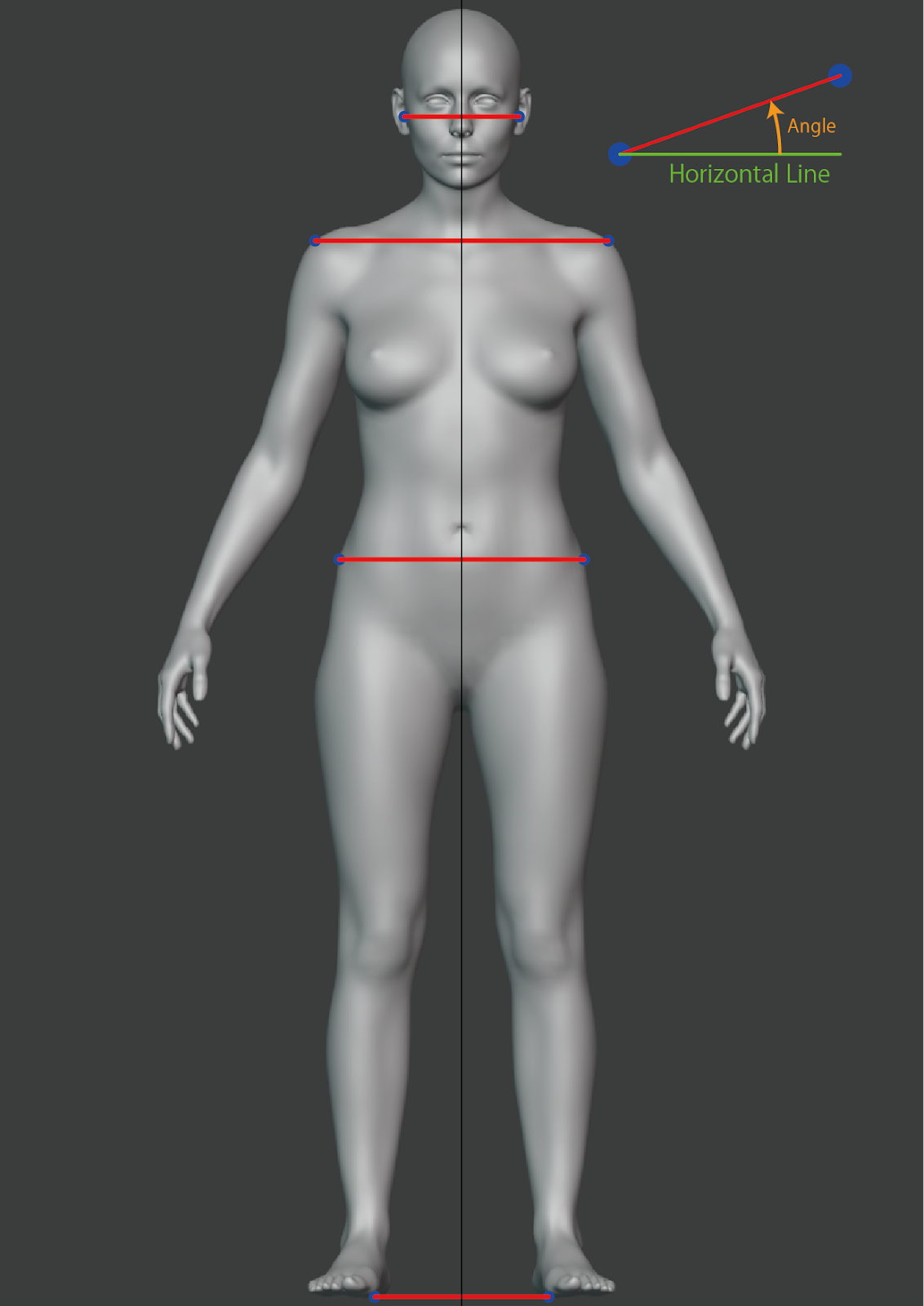
The front view exposes one two-point line per landmark plus a single angle per line. Each angle is the counterclockwise angle from the horizontal, in degrees, measured between the two points of the matching line (left-to-right in the image, i.e. right-to-left on the body).
type FrontPose = {
  angles: Array<{
    name: 'ear' | 'shoulder' | 'topHip' | 'foot';
    unit: 'degrees';
    value: number;          // counterclockwise angle from horizontal
  }>;
  lines: Array<{
    name: 'ear' | 'shoulder' | 'topHip' | 'foot';
    points: Array<{ x: number; y: number }>; // exactly 2 points (line segment)
  }>;
};
Front landmarks
Each line connects the left/right pair of the same anatomical landmark.
name | Landmark | Reference |
|---|---|---|
ear | Tragion (the cartilaginous notch in front of the ear canal). | ISO 8559-1:2017, 3.1.3 |
shoulder | Shoulder point. | ISO 8559-1:2017, 3.1.1 |
topHip | Highest point of the hip bone. | ISO 8559-1:2017, 3.1.16 |
foot | Ground level — used as a horizontal reference to compare the other angles against. | — |
Example
{
  "angles": [
    { "name": "ear",      "unit": "degrees", "value": -0.59860957 },
    { "name": "foot",     "unit": "degrees", "value": -2.0101578 },
    { "name": "shoulder", "unit": "degrees", "value": -0.23841834 },
    { "name": "topHip",   "unit": "degrees", "value": -1.3451012 }
  ],
  "lines": [
    {
      "name": "topHip",
      "points": [
        { "x": 710.16583, "y": 940.7551 },
        { "x": 456.1496,  "y": 934.7906 }
      ]
    },
    {
      "name": "ear",
      "points": [
        { "x": 654, "y": 381 },
        { "x": 519, "y": 380 }
      ]
    },
    {
      "name": "foot",
      "points": [
        { "x": 735.14667, "y": 1717.625 },
        { "x": 414.76804, "y": 1706.3802 }
      ]
    },
    {
      "name": "shoulder",
      "points": [
        { "x": 738.6984, "y": 537.90106 },
        { "x": 433.4781, "y": 536.631 }
      ]
    }
  ]
}
RightPose
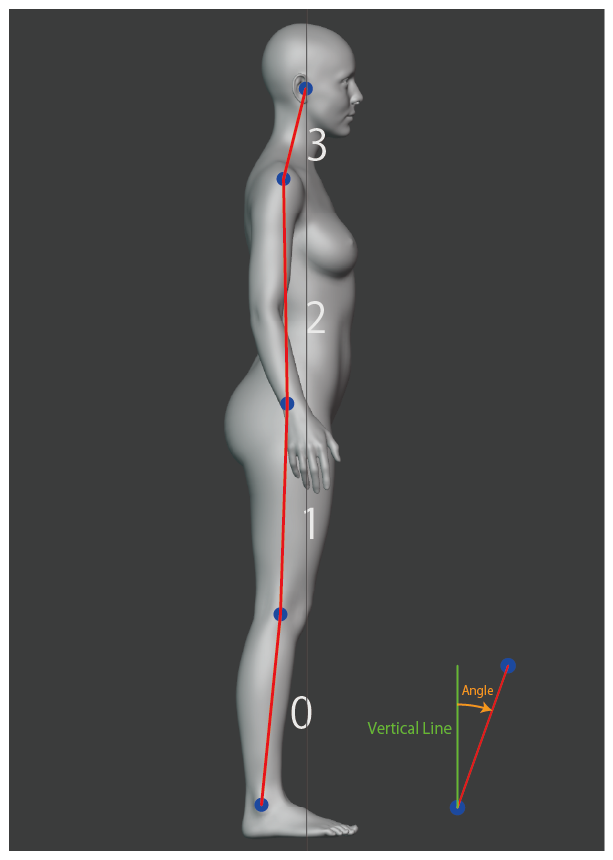
The right (side) view exposes multi-segment polylines. Each entry in angles carries an angles array — one value per segment between consecutive points. Each angle is the clockwise angle from the vertical, in degrees, measured along the segment from the lower to the higher point (i.e. ankle → ear direction along the body).
type RightPose = {
  angles: Array<{
    name: 'bodyLine' | 'backWaistLine';
    unit: 'degrees';
    angles: number[];        // bodyLine: 4 values, backWaistLine: 3 values
  }>;
  lines: Array<{
    name: 'bodyLine' | 'backWaistLine';
    points: Array<{ x: number; y: number }>; // bodyLine: 5 points, backWaistLine: 4 points
  }>;
};
For a polyline with n points, the matching angles array contains n − 1 values — each angle corresponds to the segment between points[i] and points[i + 1].
Right landmarks
bodyLine — 5 points, 4 angles
Connects the body's main vertical structure from the ground up.
| Index | Landmark | Reference |
|---|---|---|
0 | Outer ankle point. | ISO 8559-1:2017, 3.1.18 |
1 | Center of knee girth. | ISO 8559-1:2017, 5.3.22 |
2 | Highest point of the hip bone. | ISO 8559-1:2017, 3.1.16 |
3 | Shoulder point. | ISO 8559-1:2017, 3.1.1 |
4 | Tragion. | ISO 8559-1:2017, 3.1.3 |
backWaistLine — 4 points, 3 angles
Traces the back contour through the torso. Each point is the back-most point of the corresponding girth.
| Index | Landmark | Reference |
|---|---|---|
0 | Back-most point of top hip girth. | ISO 8559-1:2017, 5.3.13 |
1 | Back-most point of belly waist girth (horizontal girth through the navel). | — |
2 | Back-most point of waist girth. | ISO 8559-1:2017, 5.3.10 |
3 | Back-most point of under-bust girth. | ISO 8559-1:2017, 5.3.8 |
Example
{
  "angles": [
    {
      "name": "backWaistLine",
      "unit": "degrees",
      "angles": [21.443363, 9.388262, -4.5393705]
    },
    {
      "name": "bodyLine",
      "unit": "degrees",
      "angles": [6.476125, 1.875514, -7.529927, 21.864304]
    }
  ],
  "lines": [
    {
      "name": "backWaistLine",
      "points": [
        { "x": 549.01276, "y": 890.2904 },
        { "x": 567.0013,  "y": 844.4911 },
        { "x": 572.44586, "y": 811.5611 },
        { "x": 565.02185, "y": 718.0516 }
      ]
    },
    {
      "name": "bodyLine",
      "points": [
        { "x": 607, "y": 1770 },
        { "x": 649, "y": 1400 },
        { "x": 662, "y": 1003 },
        { "x": 593, "y": 481 },
        { "x": 656, "y": 324 }
      ]
    }
  ]
}
Notes
- All coordinates are in pixel space of the captured photo (origin top-left,
+xright,+ydown). - Front angles are signed degrees, counterclockwise from horizontal. Right angles are signed degrees, clockwise from vertical, with each segment measured from its lower point to its higher point.
- A perfectly upright pose produces angles close to
0. The sign indicates the tilt direction. - Look up entries in
linesandanglesbynamerather than by array position.
Posture names in the Bodygram Platform dashboard
The Posture analysis section of the Bodygram Platform dashboard uses friendlier display names for the same data. They map to the API names as follows:
| Dashboard label | API field |
|---|---|
| Head | front.angles[name="ear"] |
| Shoulder | front.angles[name="shoulder"] |
| Pelvis | front.angles[name="topHip"] |
| Neck | right.angles[name="bodyLine"].angles[3] |
| Back | right.angles[name="bodyLine"].angles[2] |
Screens
Use the screens query parameter on a Bodygram Scanner URL or the PWA Scanner URL to pick which screens the user sees — and in what order. Pass a comma-separated list (e.g. screens=form,scan,result). Defaults to all.
name | Description | Mandatory | Notes |
|---|---|---|---|
form | Input form for age, gender, height, and weight. | No | Scanner: to skip, pass height, weight, age, and gender (plus inches on imperial) via query parameters. PWA Scanner: skipping this screen makes formData in the completion payload null. |
how-to-scan | Instructions on how to scan. | No | — |
can-hear-voice | Instructions on voice guidance. | No | If this is the first screen, add &tap=true — iOS needs a tap gesture before audio can play. |
gyro-permission | Instructions to place/hold the device. | No | Required before the gyro screen. |
gyro | Gyro alignment screen. | No | Must be preceded by gyro-permission. |
scan | Camera + scan UI. | Yes | Camera aspect ratio may differ from the device screen — expect black/white bars on the top/bottom or sides. |
result | Scan result screen. | No | — |
all | All screens, in the default order. | No | Default value. |
Supported locales
Pass one of these codes as the {LOCALE} path parameter when building a Bodygram Scanner URL.
| Code | Language |
|---|---|
ar | Arabic |
en | English |
es | Spanish |
es-419 | Spanish (Latin America) |
fr | French |
hi-IN | Hindi |
ja | Japanese |
pt-BR | Portuguese (Brazil) |
tr | Turkish |
vi | Vietnamese |
zh-CN | Chinese (Simplified) |
zh-HK | Chinese (Hong Kong) |
zh-TW | Chinese (Traditional) |
Platform measurements
The measurements array on the scan response contains the full set of body dimensions. Each entry has name, unit, and value:
type PlatformMeasurement = {
  name: string;   // camelCase measurement key — see table below
  unit: string;   // unit string — typically "mm"
  value: number;  // integer value in the reported unit
};
Measurement names are camelCase and units are lowercase (e.g. "mm"). To convert millimeters to centimeters, divide by 10.
const { measurements } = result.entry;

// Look up a single measurement by name
const bust = measurements.find(m => m.name === 'bustGirth');
const bustCm = bust ? bust.value / 10 : null;

// Build a lookup map keyed by measurement name
const byName = Object.fromEntries(measurements.map(m => [m.name, m]));
const waistCm = byName.waistGirth.value / 10;
Measurement names
name | unit | Description |
|---|---|---|
acrossBackShoulderWidth | mm | Width across back between shoulders |
backNeckHeight | mm | Height of back neck point |
backNeckPointToGroundContoured | mm | Length from back neck to ground following body contour |
backNeckPointToWaist | mm | Length from back neck to waist |
backNeckPointToWristLengthR | mm | Length from back neck to right wrist |
bellyWaistDepth | mm | Belly waist depth (front-to-back) |
bellyWaistGirth | mm | Belly waist circumference |
bellyWaistHeight | mm | Height of belly waist |
bellyWaistWidth | mm | Belly waist width (side-to-side) |
bustGirth | mm | Bust circumference |
bustHeight | mm | Height of bust point |
calfGirthR | mm | Right calf circumference |
forearmGirthR | mm | Right forearm circumference |
hipGirth | mm | Hip circumference |
hipHeight | mm | Height of hips |
insideLegHeight | mm | Height of inside leg |
insideLegLengthR | mm | Right inside leg length |
kneeGirthR | mm | Right knee circumference |
kneeHeightR | mm | Height of right knee |
midThighGirthR | mm | Right mid-thigh circumference |
neckBaseGirth | mm | Neck base circumference |
neckGirth | mm | Neck circumference |
outerAnkleHeightR | mm | Height of right outer ankle |
outerArmLengthR | mm | Right outer arm length |
outseamR | mm | Right outseam length |
outsideLegLengthR | mm | Right outside leg length |
shoulderToElbowR | mm | Right shoulder to elbow length |
thighGirthR | mm | Right thigh circumference |
topHipGirth | mm | Top hip circumference |
topHipHeight | mm | Height of top hip |
underBustGirth | mm | Under bust circumference |
upperArmGirthR | mm | Right upper arm circumference |
waistGirth | mm | Waist circumference |
waistHeight | mm | Height of waist |
wristGirthR | mm | Right wrist circumference |
Names suffixed with R are right-side measurements. Photo scans return the full set; stats-only estimations return a subset based on the inputs available.
For the anatomical definition of each measurement, including ISO 8559-1 references and diagrams, see Measurement definitions.