
API Reference
Complete reference for all methods, configuration options, and types in the Bodygram Headless SDK.
Initialization
const sdk = new BodygramSDK({
  clientKey: 'YOUR_CLIENT_KEY',        // required
  locale: 'en',                        // required
  container: '#my-container',          // optional: CSS selector or DOM element
  scanShouldIncludeOverlay: true,      // optional: tap overlay for iOS audio fix
});| Option | Type | Required | Description |
|---|---|---|---|
clientKey | string | Yes | Your Bodygram client key. |
locale | string | Yes | UI language for the scan page. See supported locales. |
container | string | HTMLElement | No | CSS selector or DOM element where the scan UI embeds. |
scanShouldIncludeOverlay | boolean | No | When true, adds a tap overlay before the scan UI to prevent iOS audio issues. |
Throws if clientKey or locale is missing.
scan(config?)
Opens the scan UI and returns base64-encoded front and side images.
const { front, side } = await sdk.scan(config);Handles user cancellation and scan errors internally.
Config
type ScanConfig = {
  camera?: MediaTrackConstraints;
  audio?: {
    tracks?: Partial<Record<TrackName, string | null>>;
    steps?: Partial<Record<ScanAudioStep, { before?: string[]; after?: string[] }>>;
  };
  canSkipTutorialOnGoodPose?: boolean;
  silhouette?: 'male' | 'female';
  isDebuggerEnabled?: boolean;
  screensToInclude?: ScreenID[];
  welcomeModal?: 'tap-to-start' | 'how-to-scan' | false;
  isMirrored?: boolean;
  hasHeader?: boolean;
  hasActionsArea?: boolean;
};
All fields are optional.
| Option | Type | Description |
|---|---|---|
camera | MediaTrackConstraints | Constraints passed to getUserMedia. Use to select front/rear camera, set resolution, etc. |
audio | object | Custom voice guidance: replace or silence built-in clips (tracks) and play your own clips around scan steps (steps). See Custom voice guidance. |
canSkipTutorialOnGoodPose | boolean | When true, a user who is already in a good pose skips the tutorial. Set false to guarantee tutorial clips (including custom audio.steps clips) are heard in full. Defaults to true. |
silhouette | "male" | "female" | Overlay silhouette shown in the scanner to guide user positioning. |
isDebuggerEnabled | boolean | Enables the on-screen debug panel. Useful during development. Defaults to false. |
screensToInclude | ScreenID[] | List of screens to include in the flow. Valid values: "scan", "how-to-scan", "all". |
welcomeModal | 'tap-to-start' | 'how-to-scan' | false | Controls the intro modal shown before the scanner opens. 'how-to-scan' shows positioning instructions before the camera opens. false skips the modal entirely. 'tap-to-start' shows a minimal tap prompt — use this on iOS when screensToInclude is set to ["scan"] only: without a prior screen, no user gesture has been registered, and iOS will block audio playback. This is not an issue on Android. Defaults to 'how-to-scan'. |
isMirrored | boolean | Mirrors the camera preview horizontally. Defaults to true for front-facing cameras. |
hasHeader | boolean | Shows or hides the header bar on the scan screen only. Defaults to false. |
hasActionsArea | boolean | Shows or hides the bottom actions area on the scan screen only. Defaults to false. |
hasHeader and hasActionsArea apply to the scan screen only. The introduction screen (e.g. how-to-scan) always renders its own header and actions area. Configurable introduction screen layout is planned for a future release.
Camera width and height constraints depend on the device's camera capabilities. Not all devices support the same resolution ranges.
Examples
// Basic scan
const { front, side } = await sdk.scan();

// With camera constraints
const { front, side } = await sdk.scan({
  camera: {
    width: { ideal: 1920 },
    height: { ideal: 1080 },
    facingMode: 'user',
  },
});

// With silhouette overlay
const { front, side } = await sdk.scan({
  silhouette: 'female',
});

// With both options
const { front, side } = await sdk.scan({
  camera: { facingMode: 'user' },
  silhouette: 'male',
});
Custom voice guidance
Use audio to customize the voice guidance played during the scan:
audio.tracksreplaces or silences a built-in clip. The key is a track name; the value is a URL to play instead, ornullto silence it. Leaving a track out (or setting it toundefined) keeps the default clip. An override applies everywhere that track plays.audio.stepsplays extra clips around a scan step's own clip, in order:before[]→ step clip →after[].
Any {lang} token in a URL is replaced with the active locale (en, ja, …), so you can host one localized folder per language.
| Step | Built-in track it plays |
|---|---|
FrontTutorial1 | FrontScan_VoiceGuidance_FrontGuidance1 |
FrontTutorial2 | FrontScan_VoiceGuidance_FrontGuidance2 |
FrontPoseHold | FrontScan_VoiceGuidance_FrontGoodPoseHold |
FrontComplete | FrontScan_VoiceGuidance_FrontComplete |
SideTutorial | SideScan_VoiceGuidance_SideGuidance |
SidePoseHold | SideScan_VoiceGuidance_SideGoodPoseHold |
SideComplete | SideScan_VoiceGuidance_SideComplete |
Steps have no "replace" option — to replace a step's clip, override its track in audio.tracks. Other tracks exist for pose feedback (e.g. FrontScan_VoiceGuidance_FrontFeedbackOffCenter, SideScan_VoiceGuidance_SideFeedbackTooFar) and gyro/camera setup; an unknown track name throws an error that lists every valid name.
// Play a clip before the side scan starts validating
const { front, side } = await sdk.scan({
  audio: {
    steps: {
      SideTutorial: {
        after: ['https://cdn.example.com/audio/{lang}/look-down.mp3'],
      },
    },
  },
});
// Replace one clip and silence another
const { front, side } = await sdk.scan({
audio: {
tracks: {
FrontScan_VoiceGuidance_FrontGuidance1: 'https://cdn.example.com/audio/{lang}/intro.mp3',
FrontScan_VoiceGuidance_FrontFeedbackOffCenter: null,
},
},
});By default, a user already in a good pose skips the tutorial, which also cuts off any before/after clips on FrontTutorial1, FrontTutorial2, and SideTutorial. Set canSkipTutorialOnGoodPose: false to make sure they are always heard:
// Make sure tutorial clips are always heard in full
const { front, side } = await sdk.scan({
  canSkipTutorialOnGoodPose: false,
  audio: {
    steps: {
      FrontTutorial1: { before: ['https://cdn.example.com/audio/{lang}/welcome.mp3'] },
    },
  },
});
Clips must be MP3 files — other audio formats are not supported. URLs must be absolute https URLs. sdk.scan() throws a BodygramSDK: ... error for unknown track or step names, non-https URLs, or before/after values that are not arrays.
Clips are fetched with fetch() and decoded with the Web Audio API, so the server hosting them must send an Access-Control-Allow-Origin header that allows the scan page.
Step clips are blocking: the scan waits for each one to finish, so every clip adds its length to the scan. A long after clip on FrontPoseHold or SidePoseHold means the user holds the pose longer before capture.
All configured clips are preloaded when the scan opens. If a custom URL fails to load, the default Bodygram clip plays instead, then silence — a failing clip never stalls the scan.
Display captured images
The front and side values are base64-encoded strings. You can set them directly as the src of an <img> tag:
<img id="front-image" />
<img id="side-image" />

<script>
  const { front, side } = await sdk.scan();
  document.getElementById('front-image').src = front;
  document.getElementById('side-image').src = side;
</script>
Returns
{ front: string; side: string }Both values are base64-encoded strings (suitable as <img src> values directly).
Errors
The promise rejects if the user closes the scanner or the scan fails.
| Code | Description |
|---|---|
SCAN_CLOSED_BY_USER | The user dismissed the scanner before completing the scan. |
SCAN_FAILED | The scan could not be completed due to an unexpected error. |
try {
  const { front, side } = await sdk.scan(config);
} catch (err) {
  if (err.code === 'SCAN_CLOSED_BY_USER') {
    // user dismissed the scanner
  } else if (err.code === 'SCAN_FAILED') {
    // something went wrong during the scan
  }
}
selfie(config?)
Opens the selfie capture UI and returns a single base64-encoded image plus its dimensions. Use this for the lightweight single-image estimation flow.
const { image, width, height, capturedAt } = await sdk.selfie(config);Handles user cancellation and capture errors internally.
Config
type SelfieConfig = {
  facingMode?: 'user' | 'environment';
  orientation?: 'auto' | 'portrait' | 'landscape';
  requireGyro?: boolean;
  isDebug?: boolean;
};
All fields are optional.
| Option | Type | Default | Description |
|---|---|---|---|
facingMode | 'user' | 'environment' | 'user' | Which camera to open. Selfie defaults to the front-facing camera. |
orientation | 'auto' | 'portrait' | 'landscape' | 'auto' | Lock the capture orientation, or let the SDK pick based on the device. |
requireGyro | boolean | false | When true, the SDK requests DeviceOrientationEvent permission on iOS before starting. |
isDebug | boolean | false | Renders an on-screen overlay with face-tracking diagnostics. Useful during development. |
Examples
// Basic capture with defaults
const capture = await sdk.selfie();

// Lock to portrait and require gyro on iOS
const capture = await sdk.selfie({
  orientation: 'portrait',
  requireGyro: true,
});
Display the captured image
image is a base64-encoded JPEG data URL — usable directly as an <img> src:
<img id="selfie" />

<script>
  const { image } = await sdk.selfie();
  document.getElementById('selfie').src = image;
</script>
Returns
type CaptureResult = {
  image: string;       // 'data:image/jpeg;base64,...'
  width: number;       // image pixel width
  height: number;      // image pixel height
  capturedAt: number;  // unix epoch (ms) when capture completed
};
Pass image directly into getBody2FitSelfieEstimation.
Errors
The promise rejects if the user closes the selfie sheet or the iframe returns a malformed payload.
| Code | Description |
|---|---|
SELFIE_CLOSED_BY_USER | The user dismissed the selfie sheet before capturing. |
INVALID_SELFIE_CAPTURE_PAYLOAD | The iframe completed but sent back data that failed validation. |
try {
  const { image } = await sdk.selfie();
} catch (err) {
  if (err.code === 'SELFIE_CLOSED_BY_USER') {
    // user cancelled
  } else if (err.code === 'INVALID_SELFIE_CAPTURE_PAYLOAD') {
    // unexpected payload from the selfie iframe
  }
}
getBody2FitIsProductSupported(params)
Checks whether Bodygram has garment data on file for a specific product. Call this on every product page load and only show the size-finding UI if it returns true.
When to use: Before rendering a "Find my size" button or triggering Scanflow.
const supported = await sdk.getBody2FitIsProductSupported({
  brandId,    // string — required
  garmentSKU, // string — required (note: all-caps SKU)
});

if (supported) {
  // safe to show the scan/size UI
}
garmentSKU — note the capitalisation. This method uses garmentSKU (all-caps), while getBody2FitSizeRecommendation and getBody2FitSizeFitting use garmentSku (lowercase ku). This is an inconsistency in the SDK itself.
Parameters
| Parameter | Type | Required | Description |
|---|---|---|---|
brandId | string | Yes | Your brand identifier assigned by Bodygram during onboarding. |
garmentSKU | string | Yes | The product SKU to check. Note: all-caps SKU, differing from getBody2FitSizeRecommendation and getBody2FitSizeFitting, which both use lowercase garmentSku. |
Response
booleanReturns true if Bodygram has sizing data for the garment, false otherwise. This call is lightweight and safe to make on every page load.
getBody2FitPhotoEstimation(params)
Estimates body measurements from front and side photos using computer vision. This is the most accurate estimation method.
When to use: For new users who can take photos, or when you need the highest measurement accuracy.
const result = await sdk.getBody2FitPhotoEstimation({
  front,   // base64 string — required
  side,    // base64 string — required
  age,     // number, > 0 — required
  gender,  // 'male' | 'female' — required
  height,  // millimeters, 500–2500 — required
  weight,  // grams, 10000–200000 — required
  // optional:
  tightness,
  systemOfMeasurement,
  avatarType,
});
Parameters
| Parameter | Type | Required | Description |
|---|---|---|---|
front | string | Yes | Base64-encoded front photo (from sdk.scan()). |
side | string | Yes | Base64-encoded side photo (from sdk.scan()). |
age | number | Yes | User's age in years. Must be > 0. |
gender | "male" | "female" | Yes | User's gender. |
height | number | Yes | Height in millimeters (500–2500). 175 cm → 1750. |
weight | number | Yes | Weight in grams (10,000–200,000). 70 kg → 70000. |
tightness | number | No | Fit preference offset. |
systemOfMeasurement | "metric" | "imperial" | No | Output unit system. Defaults to "metric". |
avatarType | "NO_AVATAR" | "GLB" | "HIGH_RESOLUTION_VERTICES" | No | Pass "GLB" for a base64-encoded 3D avatar, or "HIGH_RESOLUTION_VERTICES" for the dense vertex set. Defaults to "NO_AVATAR". |
Throws if any required field is missing or out of range.
Response
{
  "estimations": {
    "estimationToken": {
      "token": "ESTIMATION_TOKEN"
    },
    "measurements": [
      {
        "estimationType": "BUST_GIRTH",
        "value": "920",
        "unit": "MILLIMETERS"
      }
    ],
    "avatarData": null,
    "input": {
      "preferredSystemOfMeasurement": "METRIC",
      "tightness": 0,
      "inputType": "CAMERA_FLOW"
    }
  }
}
Save the estimationToken — you can pass it to getBody2FitTokenEstimation later to retrieve the same measurements without requiring a new scan.
See all measurements for the full list of estimationType values.
getBody2FitSelfieEstimation(params)
Estimates body measurements from a single selfie image. Only selfie and height are required — every other input is optional, and the SDK supports two complementary flows depending on what the caller provides.
When to use: When you want a lower-friction capture than the two-photo Scanflow, or when only one image is available. Pair with sdk.selfie() for in-browser capture.
- Predict weight — omit
weightand (optionally) pass abodyType. The model predicts the user's weight from the selfie and applies the body-type adjustment. - Known weight — pass
weightin grams.bodyTypeis ignored whenweightis provided; supplying both logs aconsole.warn.
const result = await sdk.getBody2FitSelfieEstimation({
  selfie,    // base64 jpeg string — required
  height,    // millimeters, 500–2500 — required
  // optional:
  age,
  gender,
  weight,
  bodyType,
  tightness,
  systemOfMeasurement,
  avatarType,
});
Parameters
| Parameter | Type | Required | Description |
|---|---|---|---|
selfie | string | Yes | Base64-encoded JPEG. Must start with data:image/jpeg;base64, — non-JPEG inputs throw. |
height | number | Yes | Height in millimeters (500–2500). 175 cm → 1750. |
age | number | No | User's age in years (0–100). |
gender | "male" | "female" | No | User's gender. |
weight | number | No | Weight in grams (10,000–200,000). When set, switches to the known-weight model and bodyType is ignored. |
bodyType | "SLIM" | "AVERAGE" | "CURVY" | No | Body-type hint for the predict-weight flow. Only meaningful when weight is omitted. |
tightness | number | No | Fit preference offset. |
systemOfMeasurement | "metric" | "imperial" | No | Output unit system. Defaults to "metric". |
avatarType | "NO_AVATAR" | "GLB" | "HIGH_RESOLUTION_VERTICES" | No | Pass "GLB" for a base64-encoded 3D avatar, or "HIGH_RESOLUTION_VERTICES" for the dense vertex set. Defaults to "NO_AVATAR". |
Throws if selfie is missing or not a JPEG data URL, if height is missing or outside 500–2500, or if any optional field is out of range.
Response
Same shape as the photo and stats estimation responses, with input.inputType set to "SELFIE_FLOW".
{
  "estimations": {
    "estimationToken": { "token": "ESTIMATION_TOKEN" },
    "measurements": [...],
    "avatarData": null,
    "input": {
      "preferredSystemOfMeasurement": "METRIC",
      "tightness": 0,
      "inputType": "SELFIE_FLOW"
    }
  }
}
Current backends may emit "INPUT_TYPE_UNSPECIFIED" instead of "SELFIE_FLOW" on the selfie path. The response validator accepts both — if you discriminate on inputType, treat "INPUT_TYPE_UNSPECIFIED" as the selfie response.
See all measurements for the full list of estimationType values.
getBody2FitStatsEstimation(params)
Estimates body measurements from age, height, weight, and gender alone — no photos required.
When to use: When users prefer not to take photos, when photo capture isn't available, or as a fallback. Less accurate than photo estimation.
const result = await sdk.getBody2FitStatsEstimation({
  age,     // number, > 0 — required
  gender,  // 'male' | 'female' — required
  height,  // millimeters, 500–2500 — required
  weight,  // grams, 10000–200000 — required
  // optional:
  tightness,
  systemOfMeasurement,
  avatarType,
});
Parameters
| Parameter | Type | Required | Description |
|---|---|---|---|
age | number | Yes | User's age in years. Must be > 0. |
gender | "male" | "female" | Yes | User's gender. |
height | number | Yes | Height in millimeters (500–2500). 175 cm → 1750. |
weight | number | Yes | Weight in grams (10,000–200,000). 70 kg → 70000. |
tightness | number | No | Fit preference offset. |
systemOfMeasurement | "metric" | "imperial" | No | Output unit system. Defaults to "metric". |
avatarType | "NO_AVATAR" | "GLB" | "HIGH_RESOLUTION_VERTICES" | No | Pass "GLB" for a base64-encoded 3D avatar, or "HIGH_RESOLUTION_VERTICES" for the dense vertex set. Defaults to "NO_AVATAR". |
Throws if any required field is missing or out of range.
Response
Same shape as getBody2FitPhotoEstimation, with inputType: "MANUAL_STATS".
{
  "estimations": {
    "estimationToken": { "token": "ESTIMATION_TOKEN" },
    "measurements": [...],
    "avatarData": null,
    "input": {
      "preferredSystemOfMeasurement": "METRIC",
      "tightness": 0,
      "inputType": "MANUAL_STATS"
    }
  }
}
See all measurements for the full list of estimationType values.
getBody2FitTokenEstimation(params)
Retrieves measurements for a returning user using a previously saved estimation token — no scan or stats entry required.
When to use: When a user has already scanned or entered stats in a previous session. Eliminates friction on repeat visits.
const result = await sdk.getBody2FitTokenEstimation({
  estimationToken,  // string — required
});
Parameters
| Parameter | Type | Required | Description |
|---|---|---|---|
estimationToken | string | Yes | Token returned by a previous getBody2FitPhotoEstimation, getBody2FitSelfieEstimation, or getBody2FitStatsEstimation call. |
Throws if estimationToken is missing.
Response
Same shape as the photo, selfie, and stats estimation responses. The inputType reflects the original estimation method ("CAMERA_FLOW", "SELFIE_FLOW", or "MANUAL_STATS").
getBody2FitSizeRecommendation(params)
Returns the recommended size for one or more garments based on an estimation token.
When to use: When you need a clear size label to show to the user (e.g., "M", "L", "32").
garmentSku — note the capitalisation. This method uses garmentSku (lowercase ku), as does getBody2FitSizeFitting, while getBody2FitIsProductSupported uses garmentSKU (all-caps). This is an inconsistency in the SDK itself.
const result = await sdk.getBody2FitSizeRecommendation({
  estimationToken,  // string — required
  productInfo: [
    { brandId: 'BRAND_ID', garmentSku: 'GARMENT_SKU' },
    // additional products...
  ],
});
Parameters
| Parameter | Type | Required | Description |
|---|---|---|---|
estimationToken | string | Yes | Token from a previous estimation call. |
productInfo | Array<{ brandId: string; garmentSku: string }> | Yes | One or more products to get recommendations for. |
Throws if estimationToken or productInfo is missing, or if any product is missing brandId or garmentSku.
Response
An array with one entry per product, in the same order as productInfo:
[
  {
    "recommendation": {
      "recommendedSize": "M"
    }
  },
  {
    "recommendation": {
      "recommendedSize": "L"
    }
  }
]
getBody2FitSizeFitting(params)
Returns detailed fitting analysis for all available sizes of one or more garments.
When to use: When you want to show users how different sizes fit them — tightness at specific body areas, recommendation ranking, etc.
garmentSku — note the capitalisation. This method uses garmentSku (lowercase ku), as does getBody2FitSizeRecommendation, while getBody2FitIsProductSupported uses garmentSKU (all-caps). This is an inconsistency in the SDK itself.
const result = await sdk.getBody2FitSizeFitting({
  estimationToken,  // string — required
  productInfo: [
    { brandId: 'BRAND_ID', garmentSku: 'GARMENT_SKU' },
  ],
});
Parameters
| Parameter | Type | Required | Description |
|---|---|---|---|
estimationToken | string | Yes | Token from a previous estimation call. |
productInfo | Array<{ brandId: string; garmentSku: string }> | Yes | One or more products to analyze. |
Throws if estimationToken or productInfo is missing, or if any product is missing brandId or garmentSku.
Response
[
  {
    "result": {
      "estimationToken": { "token": "ESTIMATION_TOKEN" },
      "sizes": [
        {
          "size": { "index": 0, "name": "0" },
          "recommendationRank": 9,
          "fittingPoints": [
            { "fittingPoint": "BUST_GIRTH", "tightness": 0 }
          ],
          "tightness": 0,
          "neutralRecommendationRank": 9
        }
      ],
      "sizeGroups": []
    }
  }
]
getBodygramScannerPlatformScanToken(params)
Generates a short-lived scan token that authorizes a single Bodygram Scanner Platform scan. Each token is a standard JWT, valid for one scan, and safe to share with the client once issued.
When to use: On your server, before the client opens Scanflow or calls a Platform estimation method. The token is then passed back to the client through a protected route.
This method takes your API key and must only ever run on your server. If the API key reaches the browser your account is compromised. The client should only see the issued token, never the key. See the full server pattern in the Platform integration guide.
const { token } = await serverSdk.getBodygramScannerPlatformScanToken({
  apiKey: process.env.BODYGRAM_API_KEY,  // server-side env var
  scope: [
    'api.platform.bodygram.com/scans:create',
    'api.platform.bodygram.com/scans:read',
  ],
});
Parameters
| Parameter | Type | Required | Description |
|---|---|---|---|
apiKey | string | Yes | Your Bodygram Scanner Platform API key. Server-only — never expose in client code. |
scope | string[] | Yes | What the token bearer is allowed to do. See scopes below. |
Scopes
| Scope | Description |
|---|---|
api.platform.bodygram.com/scans:create | Allows a new scan to be created. |
api.platform.bodygram.com/scans:read | Allows scan results to be read after scanning. |
Both scopes are required for a complete scan flow.
Response
{
  "token": "eyJhbGciOiJIUzI1NiIsInR5cCI6IkpXVCJ9..."
}| Field | Type | Description |
|---|---|---|
token | string | Short-lived JWT to pass to getBodygramScannerPlatform*Estimation calls on the client. |
getBodygramScannerPlatformPhotoEstimation(params)
Estimates body measurements from front and side photos plus user stats, using the Bodygram Scanner Platform. Returns the full set of body dimensions, optional body composition, and optional posture analysis.
When to use: When you want raw body measurements (not size recommendations) and you have, or can capture, both photos. This is the most accurate Platform estimation method.
const result = await sdk.getBodygramScannerPlatformPhotoEstimation({
  token,    // string — required (from getBodygramScannerPlatformScanToken)
  front,    // base64 string — required (from sdk.scan())
  side,     // base64 string — required (from sdk.scan())
  age,      // number — required, years
  gender,   // 'male' | 'female' — required
  height,   // number — required, millimeters
  weight,   // number — required, grams
});
Parameters
| Parameter | Type | Required | Description |
|---|---|---|---|
token | string | Yes | Scan token from getBodygramScannerPlatformScanToken. One token per scan. |
front | string | Yes | Base64-encoded front photo (e.g. from sdk.scan()). |
side | string | Yes | Base64-encoded side photo (e.g. from sdk.scan()). |
age | number | Yes | User's age in years. Must be > 0. |
gender | "male" | "female" | Yes | User's gender. |
height | number | Yes | Height in millimeters. 180 cm → 1800. |
weight | number | Yes | Weight in grams. 70 kg → 70000. |
Response
{
  "entry": {
    "id": "scan_abc123",
    "status": "success",
    "input": {
      "photoScan": {
        "age": 25,
        "gender": "male",
        "height": 1800,
        "weight": 70000
      }
    },
    "measurements": [
      { "name": "bustGirth",  "unit": "mm", "value": 895 },
      { "name": "waistGirth", "unit": "mm", "value": 762 },
      { "name": "hipGirth",   "unit": "mm", "value": 905 }
    ],
    "bodyComposition": {
      "bodyFatPercentage": 18.5,
      "skeletalMuscleMass": 32.1
    },
    "avatar": {
      "data": "base64-encoded-avatar-data...",
      "format": "glb",
      "type": "UPPER_BODY"
    },
    "posture": {
      "front": {},
      "right": {}
    }
  }
}| Field | Type | Description |
|---|---|---|
entry.id | string | Scan ID — save this to retrieve the scan later. |
entry.status | "success" | "failure" | Always check before reading other fields. |
entry.measurements | PlatformMeasurement[] | null | Full set of body dimensions. null on failure. |
entry.bodyComposition | { bodyFatPercentage, skeletalMuscleMass } | null | Body composition derived from photos. |
entry.avatar | Avatar | null | 3D avatar (when generated). |
entry.posture | { front: FrontPose, right: RightPose } | null | Pose analysis from front and right views. |
On status: "failure" all of measurements, bodyComposition, avatar, and posture are null. The error object shape is not guaranteed — handle errors defensively.
getBodygramScannerPlatformStatsEstimation(params)
Estimates body measurements from age, gender, height, and weight alone — no photos required.
When to use: When users prefer not to take photos, when photo capture isn't available, or as a fallback. Less accurate than photo estimation, and bodyComposition and posture are always null (an avatar is still generated).
const result = await sdk.getBodygramScannerPlatformStatsEstimation({
  token,    // string — required (from getBodygramScannerPlatformScanToken)
  age,      // number — required, years
  gender,   // 'male' | 'female' — required
  height,   // number — required, millimeters
  weight,   // number — required, grams
});
Parameters
| Parameter | Type | Required | Description |
|---|---|---|---|
token | string | Yes | Scan token from getBodygramScannerPlatformScanToken. One token per scan. |
age | number | Yes | User's age in years. Must be > 0. |
gender | "male" | "female" | Yes | User's gender. |
height | number | Yes | Height in millimeters. 180 cm → 1800. |
weight | number | Yes | Weight in grams. 70 kg → 70000. |
Response
{
  "entry": {
    "id": "scan_abc123",
    "status": "success",
    "input": {
      "statsEstimations": {
        "age": 25,
        "gender": "male",
        "height": 1800,
        "weight": 70000
      }
    },
    "measurements": [
      { "name": "bustGirth",  "unit": "mm", "value": 895 },
      { "name": "waistGirth", "unit": "mm", "value": 762 },
      { "name": "hipGirth",   "unit": "mm", "value": 905 }
    ],
    "bodyComposition": null,
    "avatar": {
      "data": "base64-encoded-avatar-data...",
      "format": "obj",
      "type": "highResolution"
    },
    "posture": null
  }
}
Response shape is identical to getBodygramScannerPlatformPhotoEstimation except input is keyed under statsEstimations instead of photoScan, and bodyComposition and posture are always null. An avatar is still generated from the stats.
Supported Locales
Pass one of these codes as the locale option during initialization.
| Code | Language |
|---|---|
ar | Arabic |
en | English |
es | Spanish |
es-419 | Spanish (Latin America) |
fr | French |
hi-IN | Hindi |
ja | Japanese |
pt-BR | Portuguese (Brazil) |
tr | Turkish |
vi | Vietnamese |
zh-CN | Chinese (Simplified) |
zh-HK | Chinese (Hong Kong) |
zh-TW | Chinese (Traditional) |
Measurements
All measurements returned by Body2Fit methods (getBody2FitPhotoEstimation, getBody2FitSelfieEstimation, getBody2FitStatsEstimation, getBody2FitTokenEstimation) in estimations.measurements. Each entry has estimationType, value, and unit.
Note: The Bodygram Scanner Platform methods (
getBodygramScannerPlatform*Estimation) use a different shape — seePlatformMeasurementbelow.
estimationType | unit | Description |
|---|---|---|
AGE | YEARS | Age |
GENDER | GENDER | Gender — "1" for male, "2" for female |
WEIGHT | GRAMS | Weight |
HEIGHT | MILLIMETERS | Height |
ACROSS_BACK_SHOULDER_WIDTH | MILLIMETERS | Width across back between shoulders |
BACK_NECK_HEIGHT | MILLIMETERS | Height of back neck point |
BACK_NECK_POINT_TO_GROUND_CONTOURED | MILLIMETERS | Length from back neck to ground following body contour |
BACK_NECK_POINT_TO_WAIST | MILLIMETERS | Length from back neck to waist |
BACK_NECK_POINT_TO_WRIST_R | MILLIMETERS | Length from back neck to right wrist |
BELLY_WAIST_GIRTH | MILLIMETERS | Belly waist circumference |
BELLY_WAIST_HEIGHT | MILLIMETERS | Height of belly waist |
BUST_GIRTH | MILLIMETERS | Bust circumference |
BUST_HEIGHT | MILLIMETERS | Height of bust point |
CALF_GIRTH_R | MILLIMETERS | Right calf circumference |
FOREARM_GIRTH_R | MILLIMETERS | Right forearm circumference |
HIP_GIRTH | MILLIMETERS | Hip circumference |
HIP_HEIGHT | MILLIMETERS | Height of hips |
INSIDE_LEG_HEIGHT | MILLIMETERS | Height of inside leg |
INSIDE_LEG_LENGTH_R | MILLIMETERS | Right inside leg length |
KNEE_GIRTH_R | MILLIMETERS | Right knee circumference |
KNEE_HEIGHT_R | MILLIMETERS | Height of right knee |
MID_THIGH_GIRTH_R | MILLIMETERS | Right mid-thigh circumference |
NECK_BASE_GIRTH | MILLIMETERS | Neck base circumference |
NECK_GIRTH | MILLIMETERS | Neck circumference |
OUTER_ANKLE_HEIGHT_R | MILLIMETERS | Height of right outer ankle |
OUTER_ARM_LENGTH_R | MILLIMETERS | Right outer arm length |
OUTSEAM_R | MILLIMETERS | Right outseam length |
OUTSIDE_LEG_LENGTH_R | MILLIMETERS | Right outside leg length |
SHOULDER_TO_ELBOW_R | MILLIMETERS | Right shoulder to elbow length |
THIGH_GIRTH_R | MILLIMETERS | Right thigh circumference |
TOP_HIP_GIRTH | MILLIMETERS | Top hip circumference |
TOP_HIP_HEIGHT | MILLIMETERS | Height of top hip |
UNDER_BUST_GIRTH | MILLIMETERS | Under bust circumference |
UPPER_ARM_GIRTH_R | MILLIMETERS | Right upper arm circumference |
WAIST_GIRTH | MILLIMETERS | Waist circumference |
WAIST_HEIGHT | MILLIMETERS | Height of waist |
WRIST_GIRTH_R | MILLIMETERS | Right wrist circumference |
PlatformMeasurement
Returned by the Bodygram Scanner Platform methods (getBodygramScannerPlatformPhotoEstimation and getBodygramScannerPlatformStatsEstimation) inside entry.measurements. Each entry has name, unit, and value.
type PlatformMeasurement = {
  name: string;   // camelCase measurement key — see table below
  unit: string;   // unit string — typically "mm"
  value: number;  // integer value in the reported unit
};
Unlike the Body2Fit Measurements table above (uppercase estimationType, MILLIMETERS), the platform response uses camelCase names and lowercase unit codes. To convert millimeter values to centimeters, divide by 10.
const { measurements } = result.entry;

// Look up a single measurement by name
const bust = measurements.find(m => m.name === 'bustGirth');
const bustCm = bust ? bust.value / 10 : null;

// Build a lookup map keyed by measurement name
const byName = Object.fromEntries(measurements.map(m => [m.name, m]));
const waistCm = byName.waistGirth.value / 10;
Measurement names
name | unit | Description |
|---|---|---|
acrossBackShoulderWidth | mm | Width across back between shoulders |
backNeckHeight | mm | Height of back neck point |
backNeckPointToGroundContoured | mm | Length from back neck to ground following body contour |
backNeckPointToWaist | mm | Length from back neck to waist |
backNeckPointToWristLengthR | mm | Length from back neck to right wrist |
bellyWaistDepth | mm | Belly waist depth (front-to-back) |
bellyWaistGirth | mm | Belly waist circumference |
bellyWaistHeight | mm | Height of belly waist |
bellyWaistWidth | mm | Belly waist width (side-to-side) |
bustGirth | mm | Bust circumference |
bustHeight | mm | Height of bust point |
calfGirthR | mm | Right calf circumference |
forearmGirthR | mm | Right forearm circumference |
hipGirth | mm | Hip circumference |
hipHeight | mm | Height of hips |
insideLegHeight | mm | Height of inside leg |
insideLegLengthR | mm | Right inside leg length |
kneeGirthR | mm | Right knee circumference |
kneeHeightR | mm | Height of right knee |
midThighGirthR | mm | Right mid-thigh circumference |
neckBaseGirth | mm | Neck base circumference |
neckGirth | mm | Neck circumference |
outerAnkleHeightR | mm | Height of right outer ankle |
outerArmLengthR | mm | Right outer arm length |
outseamR | mm | Right outseam length |
outsideLegLengthR | mm | Right outside leg length |
shoulderToElbowR | mm | Right shoulder to elbow length |
thighGirthR | mm | Right thigh circumference |
topHipGirth | mm | Top hip circumference |
topHipHeight | mm | Height of top hip |
underBustGirth | mm | Under bust circumference |
upperArmGirthR | mm | Right upper arm circumference |
waistGirth | mm | Waist circumference |
waistHeight | mm | Height of waist |
wristGirthR | mm | Right wrist circumference |
Names suffixed with R are right-side measurements. Photo scans return the full set; stats-only estimations return a subset based on the inputs available.
Fitting Points
All fitting points returned in sizes[].fittingPoints. Each entry has a fittingPoint key and a tightness value.
fittingPoint | Display name |
|---|---|
NECK_GIRTH | Neck |
SHOULDER_WIDTH | Shoulders |
SLEEVE_LENGTH_CENTER_BACK | Sleeve |
SLEEVE_LENGTH | Sleeve |
CHEST | Chest Width |
BODY_WIDTH | Chest Width |
WAIST | Waist |
HIP | Hips |
INSEAM | Inseam |
THIGH_GIRTH | Thigh |
DRESS_LENGTH | Length |
SKIRT_LENGTH | Length |
MINISKIRT_LENGTH | Length |
HALF_CALF_SKIRT_LENGTH | Length |
ANKLE_SKIRT_LENGTH | Length |
ANKLE_DRESS_LENGTH | Length |
BODY_LENGTH | Length |
UNDERBUST | Underbust |
Avatar
The avatar object is returned when the scan includes avatar generation.
{
  data: string;   // base64-encoded avatar data
  format: string; // file format (e.g. "glb")
  type: string;   // avatar type (e.g. "UPPER_BODY", "FULL_BODY")
}
Posture
The posture object contains pose analysis data for the front and right views captured during scanning. Each view returns two arrays:
angles— measured angles (in degrees) for named body landmarks.lines— pixel-coordinate polylines used to derive those angles, plotted in the source image space (origin at the top-left of the captured photo).
{
  front: FrontPose;
  right: RightPose;
}
FrontPose
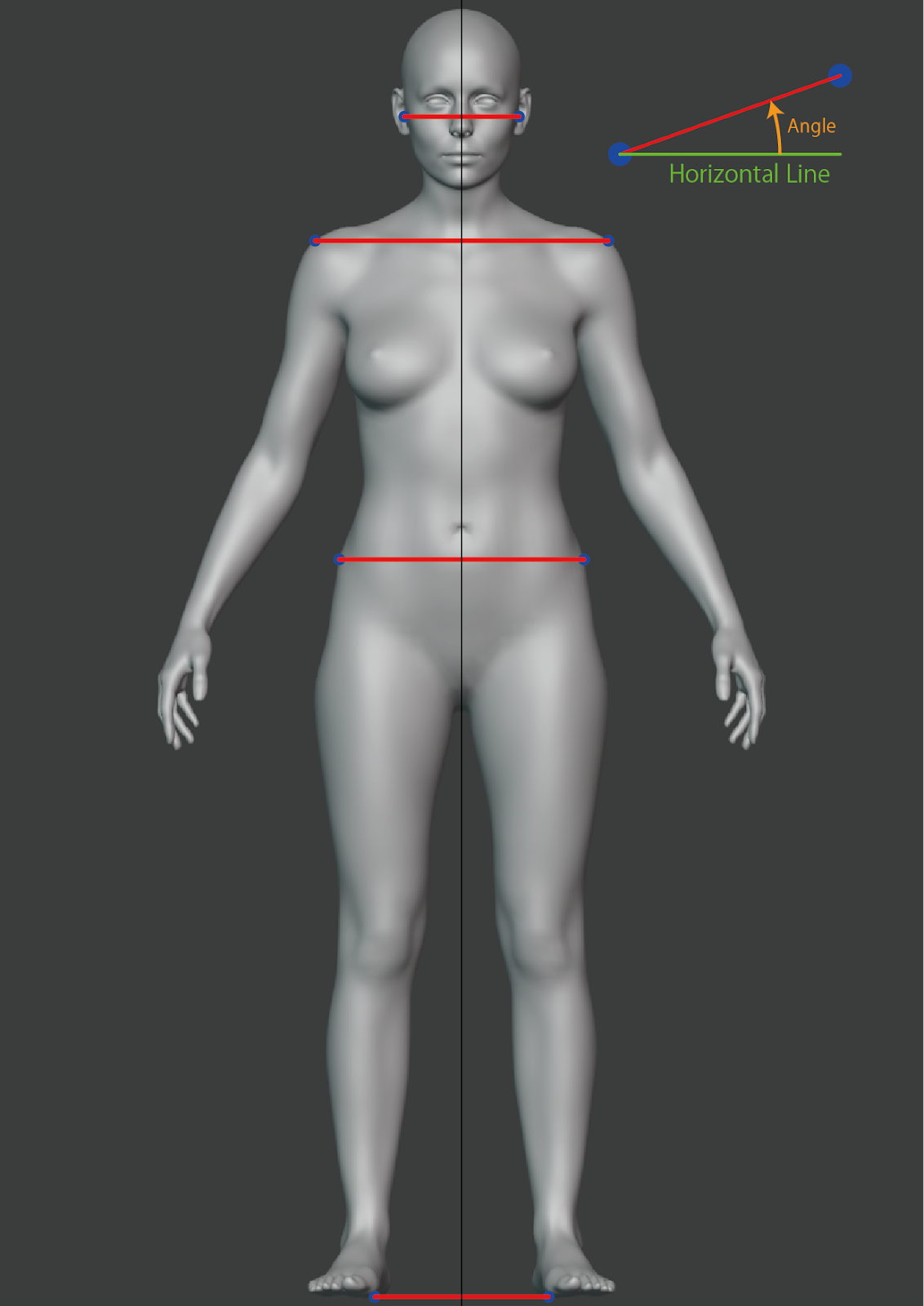
Front view exposes one two-point line per landmark plus a single angle per line. Each angle is the counterclockwise angle from the horizontal, in degrees, measured between the two points of the matching line (left-to-right in the image, i.e. right-to-left on the body).
type FrontPose = {
  angles: Array<{
    name: 'ear' | 'shoulder' | 'topHip' | 'foot';
    unit: 'degrees';
    value: number;          // counterclockwise angle from horizontal
  }>;
  lines: Array<{
    name: 'ear' | 'shoulder' | 'topHip' | 'foot';
    points: Array<{ x: number; y: number }>; // exactly 2 points (line segment)
  }>;
};
Front landmarks
Each line connects the left/right pair of the same anatomical landmark.
name | Landmark | Reference |
|---|---|---|
ear | Tragion (the cartilaginous notch in front of the ear canal). | ISO 8559-1:2017, 3.1.3 |
shoulder | Shoulder point. | ISO 8559-1:2017, 3.1.1 |
topHip | Highest point of the hip bone. | ISO 8559-1:2017, 3.1.16 |
foot | Ground level — used as a horizontal reference to compare the other angles against. | — |
Example
{
  "angles": [
    { "name": "ear",      "unit": "degrees", "value": -0.59860957 },
    { "name": "foot",     "unit": "degrees", "value": -2.0101578 },
    { "name": "shoulder", "unit": "degrees", "value": -0.23841834 },
    { "name": "topHip",   "unit": "degrees", "value": -1.3451012 }
  ],
  "lines": [
    {
      "name": "topHip",
      "points": [
        { "x": 710.16583, "y": 940.7551 },
        { "x": 456.1496,  "y": 934.7906 }
      ]
    },
    {
      "name": "ear",
      "points": [
        { "x": 654, "y": 381 },
        { "x": 519, "y": 380 }
      ]
    },
    {
      "name": "foot",
      "points": [
        { "x": 735.14667, "y": 1717.625 },
        { "x": 414.76804, "y": 1706.3802 }
      ]
    },
    {
      "name": "shoulder",
      "points": [
        { "x": 738.6984, "y": 537.90106 },
        { "x": 433.4781, "y": 536.631 }
      ]
    }
  ]
}
RightPose
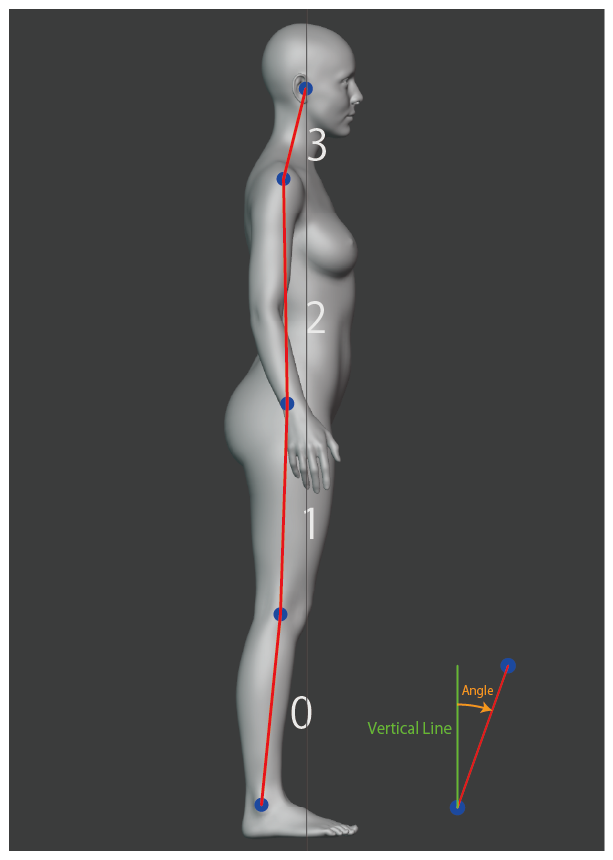
Right (side) view exposes multi-segment polylines. Each entry in angles carries an angles array — one value per segment between consecutive points. Each angle is the clockwise angle from the vertical, in degrees, measured along the segment from the lower to the higher point (i.e. ankle → ear direction along the body).
type RightPose = {
  angles: Array<{
    name: 'bodyLine' | 'backWaistLine';
    unit: 'degrees';
    angles: number[];        // bodyLine: 4 values, backWaistLine: 3 values
  }>;
  lines: Array<{
    name: 'bodyLine' | 'backWaistLine';
    points: Array<{ x: number; y: number }>; // bodyLine: 5 points, backWaistLine: 4 points
  }>;
};
For a polyline with n points, the matching angles array contains n − 1 values — each angle corresponds to the segment between points[i] and points[i + 1].
Right landmarks
bodyLine — 5 points, 4 angles
Connects the body's main vertical structure from the ground up.
| Index | Landmark | Reference |
|---|---|---|
0 | Outer ankle point. | ISO 8559-1:2017, 3.1.18 |
1 | Center of knee girth. | ISO 8559-1:2017, 5.3.22 |
2 | Highest point of the hip bone. | ISO 8559-1:2017, 3.1.16 |
3 | Shoulder point. | ISO 8559-1:2017, 3.1.1 |
4 | Tragion. | ISO 8559-1:2017, 3.1.3 |
backWaistLine — 4 points, 3 angles
Traces the back contour through the torso. Each point is the back-most point of the corresponding girth.
| Index | Landmark | Reference |
|---|---|---|
0 | Back-most point of top hip girth. | ISO 8559-1:2017, 5.3.13 |
1 | Back-most point of belly waist girth (horizontal girth through the navel). | — |
2 | Back-most point of waist girth. | ISO 8559-1:2017, 5.3.10 |
3 | Back-most point of under-bust girth. | ISO 8559-1:2017, 5.3.8 |
Example
{
  "angles": [
    {
      "name": "backWaistLine",
      "unit": "degrees",
      "angles": [21.443363, 9.388262, -4.5393705]
    },
    {
      "name": "bodyLine",
      "unit": "degrees",
      "angles": [6.476125, 1.875514, -7.529927, 21.864304]
    }
  ],
  "lines": [
    {
      "name": "backWaistLine",
      "points": [
        { "x": 549.01276, "y": 890.2904 },
        { "x": 567.0013,  "y": 844.4911 },
        { "x": 572.44586, "y": 811.5611 },
        { "x": 565.02185, "y": 718.0516 }
      ]
    },
    {
      "name": "bodyLine",
      "points": [
        { "x": 607, "y": 1770 },
        { "x": 649, "y": 1400 },
        { "x": 662, "y": 1003 },
        { "x": 593, "y": 481 },
        { "x": 656, "y": 324 }
      ]
    }
  ]
}
Notes
- All coordinates are in pixel space of the captured photo (origin top-left,
+xright,+ydown). - Front angles are signed degrees, counterclockwise from horizontal. Right angles are signed degrees, clockwise from vertical, with each segment measured from its lower point to its higher point.
- A perfectly upright pose produces angles close to
0. The sign indicates the tilt direction. - Look up entries in
linesandanglesbynamerather than by array position.
Posture names in the Bodygram Platform dashboard
The Posture analysis section of the Bodygram Platform dashboard uses friendlier display names for the same data. They map to the API names as follows:
| Dashboard label | API field |
|---|---|
| Head | front.angles[name="ear"] |
| Shoulder | front.angles[name="shoulder"] |
| Pelvis | front.angles[name="topHip"] |
| Neck | right.angles[name="bodyLine"].angles[3] |
| Back | right.angles[name="bodyLine"].angles[2] |